InfluxDB Publisher Agent
The InfluxDB Publisher Agent acts like the OCS Aggregator, but instead of writing to file it will publish all recorded OCS data feeds to an InfluxDB instance running somewhere on the network.
usage: agent.py [-h] [--initial-state {idle,record}] [--host HOST]
                [--port PORT] [--database DATABASE] [--protocol {json,line}]
                [--ssl SSL] [--verify-ssl VERIFY_SSL] [--gzip GZIP]
Agent Options
- --initial-state
Possible choices: idle, record
Initial state of argument parser. Can be either idle or record
Default:
'record'- --host
InfluxDB host address.
Default:
'influxdb'- --port
InfluxDB port.
Default:
8086- --database
Database within InfluxDB to publish data to.
Default:
'ocs_feeds'- --protocol
Possible choices: json, line
Protocol for writing data. Either ‘line’ or ‘json’.
Default:
'line'- --ssl
Use https instead of http to connect to InfluxDB, defaults to False.
Default:
False- --verify-ssl
Verify SSL certificates for HTTPS requests, defaults to False.
Default:
False- --gzip
Use gzip content encoding to compress requests.
Default:
False
Configuration File Examples
Below are configuration examples for the ocs config file and for running the Agent in a docker container. Also included is an example for setting up Grafana to display data from InfluxDB.
OCS Site Config
Add an InfluxDBAgent to your OCS configuration file:
{'agent-class': 'InfluxDBAgent',
 'instance-id': 'influxagent',
 'arguments': ['--initial-state', 'record',
               '--host', 'influxdb',
               '--port', 8086,
               '--protocol', 'line',
               '--gzip', True,
               '--ssl', False,
               '--verify-ssl', False,
               '--database', 'ocs_feeds']},
Docker Compose
Add the InfluxDB Publisher Agent container to your docker compose file:
ocs-influxdb-publisher:
  image: simonsobs/ocs:latest
  hostname: ocs-docker
  environment:
    - INSTANCE_ID=influxagent
    - INFLUXDB_USERNAME=admin       # optional
    - INFLUXDB_PASSWORD=password    # optional
  volumes:
    - ${OCS_CONFIG_DIR}:/config:ro
By default, InfluxDB HTTP authentication is not required. However, if needed, you can optionally pass credentials to use when connecting to your InfluxDB instance through the environment variables shown above or through a file, for instance if you would like to use Docker Secrets. A Docker Secrets example is shown below:
secrets:
  INFLUXDB_USERNAME:
    file: ${PWD}/secrets/INFLUXDB_USERNAME
  INFLUXDB_PASSWORD:
    file: ${PWD}/secrets/INFLUXDB_PASSWORD
services:
  ocs-influxdb-publisher:
    image: simonsobs/ocs:latest
    hostname: ocs-docker
    secrets:
      - INFLUXDB_USERNAME
      - INFLUXDB_PASSWORD
    environment:
      - INSTANCE_ID=influxagent
      - INFLUXDB_USERNAME_FILE=/run/secrets/INFLUXDB_USERNAME
      - INFLUXDB_PASSWORD_FILE=/run/secrets/INFLUXDB_PASSWORD
    volumes:
      - ${OCS_CONFIG_DIR}:/config:ro
Note
The INFLUXDB_USERNAME and INFLUXDB_PASSWORD variables will take
precedence if they are also present when using the _FILE variables.
You will also need an instance of InfluxDB running somewhere on your network. This likely should go in a separate docker compose file so that it remains online at all times. An example compose file would look like:
services:
  influxdb:
    image: "influxdb:1.7"
    container_name: "influxdb"
    restart: always
    ports:
      - "8086:8086"
    environment:
      - INFLUXDB_HTTP_LOG_ENABLED=false
    volumes:
      - /srv/influxdb:/var/lib/influxdb

networks:
  default:
    external:
      name: ocs-net
Note
This separate docker compose file setup depends on having a docker network that connects your various docker compose files. On a single-node setup this can be accomplished with the network settings above in each docker compose file.
You then need to create the docker network with:
$ docker network create --driver bridge ocs-net
Containers on the network should then be able to communicate.
For more information about configuring Docker Compose files, see the Compose file reference.
Grafana
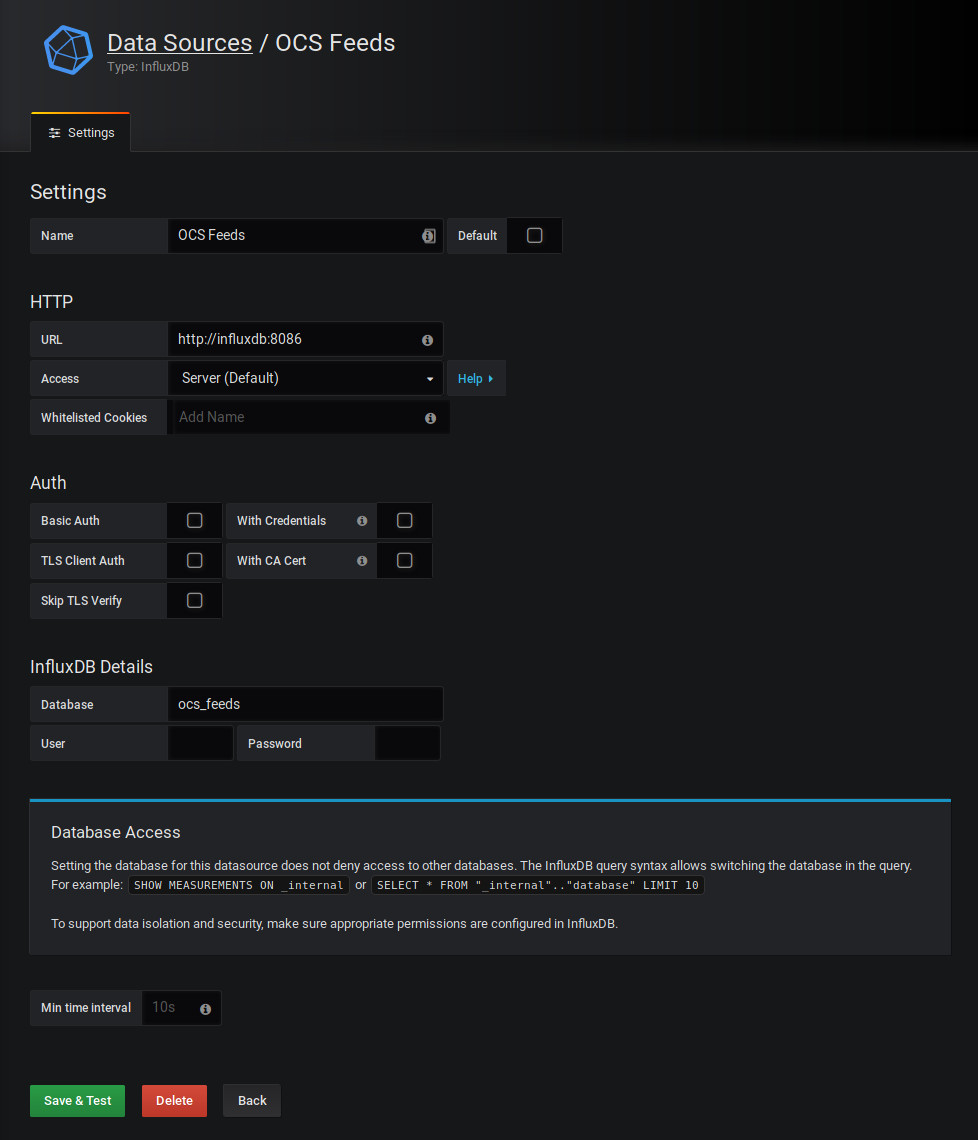
Once your InfluxDB container and publisher are configured and running you will
need to create an InfluxDB data source in Grafana. To do so, we add an InfluxDB
data source with the URL http://influxdb:8086, and the Database
(default “ocs_feeds”, but this can be customized in your OCS config file.) The
Name of the Data Source is up to you, in this example we set it to “OCS Feeds”.
Note
The “ocs_feeds” database (or whatever you choose to name the database) will not exist until the first time the InfluxDB Publisher Agent has successfully connected to the InfluxDB.
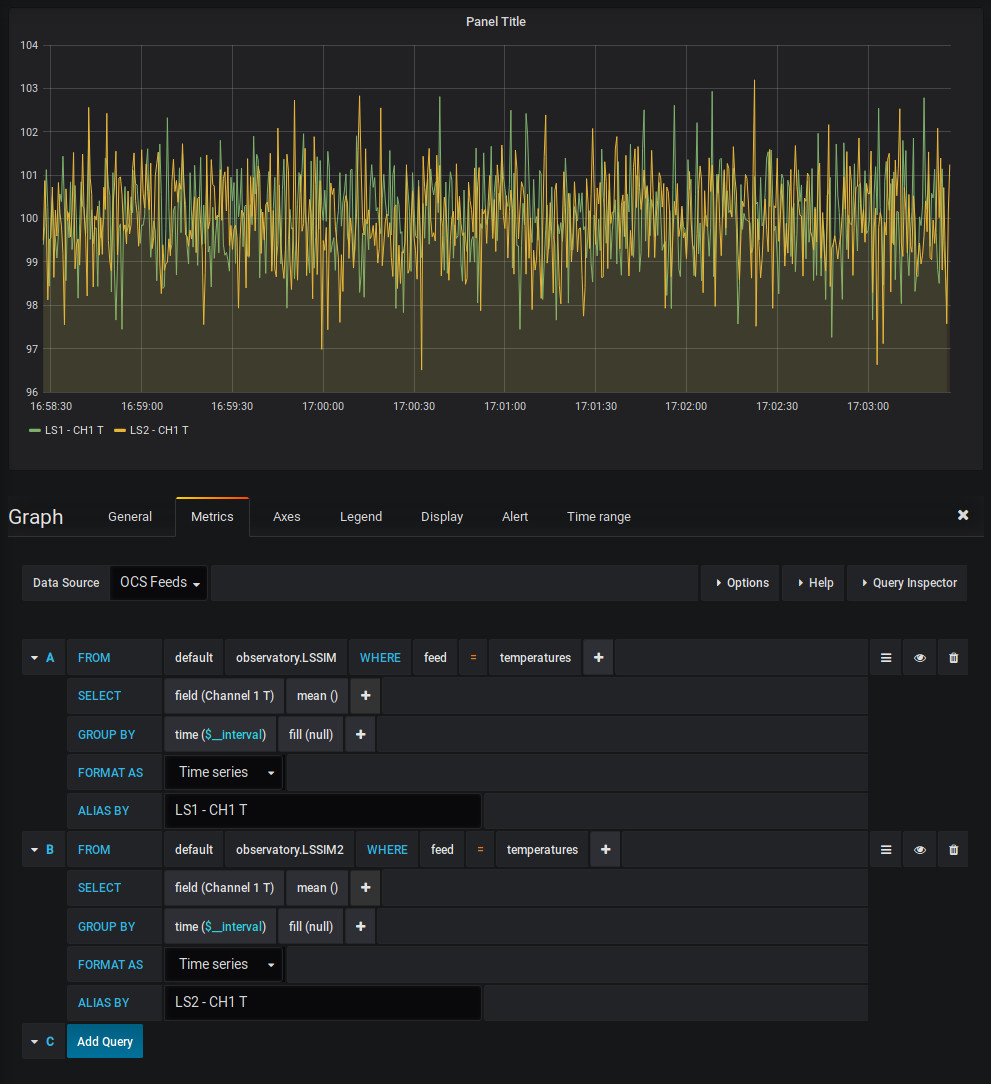
In a dashboard, create a new panel. Each panel can have a different Data Source, which is selected at the top of the Metrics tab. Select our “OCS Feeds” data source. You’ll then see the rich query editor for your InfluxDB data source. Each OCS Agent shows up as a “measurement” (here “observatory.LSSIM” and “observatory.LSSIM2”). Each feed published by an agent is an InfluxDB tag (here “temperatures” is our only feed.) Finally, each field is available within the SELECT query.
For more information about using InfluxDB in Grafana, see the Grafana Documentation.
Agent API
- class ocs.agents.influxdb_publisher.agent.InfluxDBAgent(agent, args)[source]
This class provide a WAMP wrapper for the data publisher. The run function and the data handler are thread-safe, as long as multiple run functions are not started at the same time, which should be prevented through OCSAgent.
- Parameters:
agent (OCSAgent) – OCS Agent object
args (namespace) – args from the function’s argparser.
- data_dir
Path to the base directory where data should be written.
- Type:
path
- aggregate
Specifies if the agent is currently aggregating data.
- Type:
bool
- incoming_data
Thread-safe queue where incoming (data, feed) pairs are stored before being passed to the Publisher.
- Type:
queue.Queue
- loop_time
Time between iterations of the run loop.
- Type:
float
- record()[source]
Process - This process will create an Publisher instance, which will collect and write provider data to disk as long as this process is running.
- Parameters:
test_mode (bool, optional) – Run the record Process loop only once. This is meant only for testing. Default is False.
Notes
An example of the session data:
>>> response.session['data']
{'connected': True,
 'last_updated': 1774389203.53926}
Supporting APIs
- class ocs.agents.influxdb_publisher.agent.Publisher(host, database, incoming_data, port=8086, protocol='line', ssl=False, verify_ssl=False, gzip=False, operate_callback=None)[source]
Data publisher. This manages data to be published to the InfluxDB.
This class should only be accessed by a single thread. Data can be passed to it by appending it to the referenced incoming_data queue.
- Parameters:
incoming_data (queue.Queue) – A thread-safe queue of (data, feed) pairs.
host (str) – host for InfluxDB instance.
database (str) – database name within InfluxDB to publish to
port (int, optional) – port for InfluxDB instance, defaults to 8086.
protocol (str, optional) – Protocol for writing data. Either ‘line’ or ‘json’.
ssl (bool, optional) – Use https instead of http to connect to InfluxDB, defaults to False.
verify_ssl (bool, optional) – Verify SSL certificates for HTTPS requests, defaults to False.
gzip (bool, optional) – compress influxdb requsts with gzip
operate_callback (callable, optional) – Function to call to see if failed connections should be retried (to prevent a thread from locking).
- db
database name within InfluxDB to publish to (from database arg)
- Type:
str
- protocol
Protocol for writing data. Either ‘line’ or ‘json’.
- Type:
str, optional
- incoming_data
data to be published
- client_args
arguments passed to InfluxDB client
- client
InfluxDB client connection
- connected
True if connected to InfluxDB, False if not.
- Type:
bool
- process_incoming_data()[source]
Takes all data from the incoming_data queue, and writes them to the InfluxDB.